BN-CPE-1000C SIM Card Installation

Important: The BN-CPE-1000C cellular SIM card is a Micro SIM. The SIM card must be inserted into the SIM slot in the correct orientation, and after the insertion, the device must be power rebooted for the CPE to detect the SIM.
Step 1: Powered down the device
The first step for BN-CPE-1000C SIM card installation is to powered down the device. This step is only effective if you remove the power plug. Simply press the power button does not shut down the power.
Step 2: Insert the SIM Card
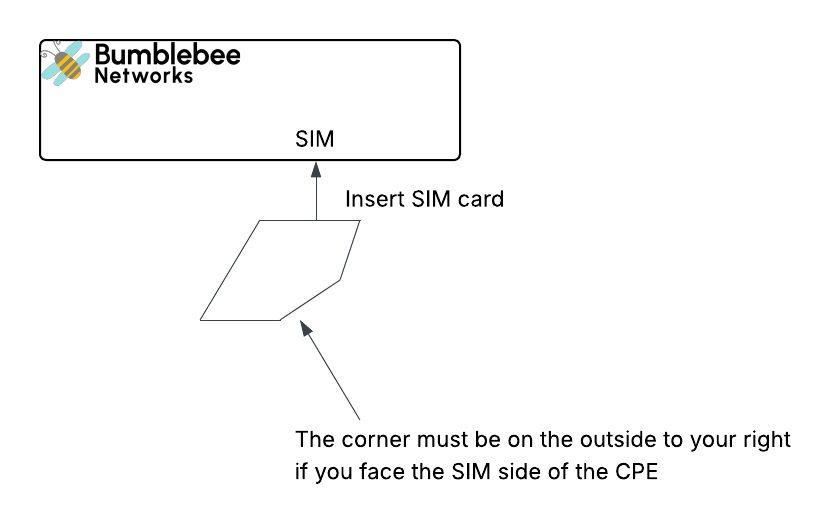
Insert the SIM card all the way in until if locks. Make sure the SIM card corner is on the outside to your right if you face the CPE device, as shown in the below diagram.
Step 3: Powered up the device
Plug in the power supply.
Step 4: Check Cellular Status
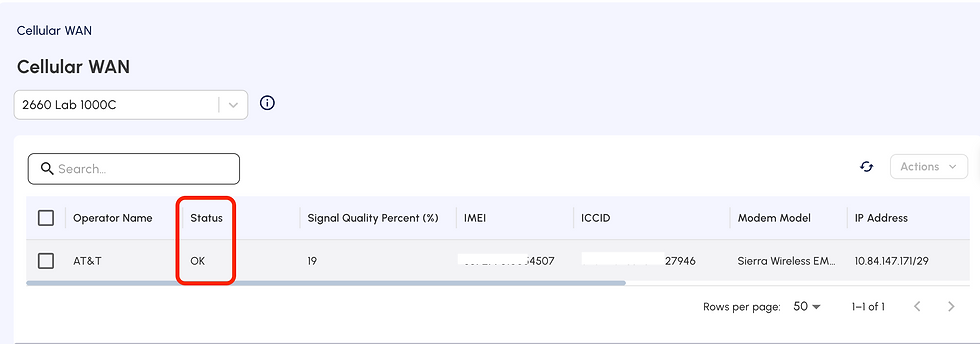
Login to the Bumblebee portal
Click Cellular WAN on the left side navigation menu
Select the desired CPE
The Status should be OK. If the Status is "sim missing", the SIM card is not inserted correctly or the SIM card is damaged. Repeat from Step 1 and try agin.


Comments